---
title: "Sudoku for iPad and Android Tablets: No Ads, Offline"
description: "Free Sudoku for iPad, Android tablets and Mac, with real portrait and landscape layouts, split-screen support and keyboard shortcuts. No ads, works offline."
url: https://sudoku.rubigogames.com/sudoku-app-for-ipad-and-tablets.html
language: en
last_modified: 2026-10-24
---
# Sudoku for iPad, Android tablets and Mac
Sudoku - No Ads & Offline is a free Sudoku app with layouts made for tablets, not a phone screen stretched to fit. On iPad and Android tablets it plays in portrait and landscape and takes a hardware keyboard. On iPad it follows its window in Split View and Stage Manager, and on Android in split-screen. The same iPad app runs on Mac computers with Apple silicon. There are no ads for anyone, and every mode works offline.
[Download on the App Store](https://apps.apple.com/app/apple-store/id6502922368?pt=125379530&ct=official_site&mt=8) [Get it on Google Play](https://play.google.com/store/apps/details?id=com.rubigogames.sudoku&referrer=utm_source%3Dofficial_site%26utm_medium%3Dweb%26utm_campaign%3Dsite)
## A layout for every shape of screen
1. ### Portrait
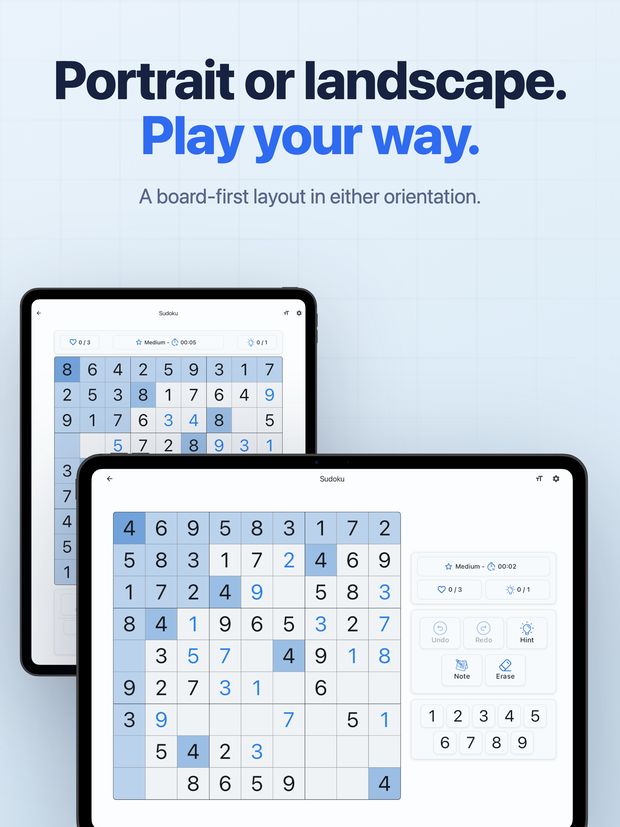
The board is drawn large in the middle of the screen, with the toolbar and the number pad grouped together below it, sized for a tablet rather than a phone.
2. ### Landscape
A large square board sits on the left. On the right, one column holds the level, the timer, your mistakes and hints, then the toolbar, then the number pad, so nothing covers the grid.
3. ### Split View, Stage Manager and split-screen
The layout follows the window, not the device, on iPad and on Android. Make the window narrow and the game switches to its compact layout; widen it and the tablet layout comes back, in the middle of a game, without losing a move.
4. ### Lessons side by side
In a wide landscape window, the technique lessons and Show the sure move in the Coach's Report place the board and the explanation next to each other.
## Keyboard shortcuts
With a keyboard attached to an iPad or an Android tablet, or on a Mac, you can play a whole game without touching the screen. These keys work during a game while no hint is open. In color mode, the number keys, N and Delete work on colors, as the pad does.
| Key | What it does |
|---|---|
| 1 to 9 | Enter that number in the selected cell, or a note in notes mode |
| Arrow keys | Move the selection around the board |
| Backspace, Delete or 0 | Erase the selected cell |
| N or Space | Turn notes mode on or off |
| Cmd + Z or Ctrl + Z | Undo |
| Esc or P | Pause the game |
| V | Turn color mode on or off, when Color Marks is on |
| Z, X and C | With Corner + Center notes: numbers, corner notes, center notes |
| Shift or Option (Alt) + number | With Corner + Center notes: one corner note |
| Cmd or Ctrl + number | With Corner + Center notes: one center note |
There is no key for a hint, on purpose: hints can be limited, and a stray key press should never spend one.
## The whole app, on a bigger board
Everything on the phone is on the tablet: unlimited puzzles at six levels graded by technique, hints that explain the step, 36 lessons, the Daily Challenge, the Coach's Report, Zen mode, Corner + Center notes and Color Marks. iPad and iPhone share one App Store app, and Android phones and tablets share one Google Play app.
## Keep reading
[How the hints teach](https://sudoku.rubigogames.com/sudoku-app-hints-explained.html): What a hint shows you, step by step, before it places a number. Hints explained
[All 37 techniques](https://sudoku.rubigogames.com/sudoku-techniques.html): From Naked Single to 3D Medusa, with a worked board from the app for 36 of them. Browse the ladder
[Every question answered](https://sudoku.rubigogames.com/faq.html): Ads, offline play, what is free and what Pro adds. Read the FAQ
## Questions about tablets
Does it work in landscape on iPad?
Yes. iPad plays in all four orientations, and landscape has its own layout: a large square board on the left, and the controls in one column on the right. iPhone stays in portrait.
Does it run on Android tablets?
Yes. On an Android tablet the game turns with the screen and uses the same tablet layouts as iPad, in portrait and in landscape, and in split-screen it follows the size of its window. Android phones stay in portrait.
Can I play it on a Mac?
Yes, on a Mac with Apple silicon running macOS 12.0 or later. The iPad app installs from the App Store on the Mac and runs in its own window, and the keyboard shortcuts on this page work there too.
Can I play with a hardware keyboard?
Yes, on iPad, Android tablets and Mac, and on a phone with a Bluetooth keyboard. Numbers, arrow keys, erase, notes, undo and pause all have keys, listed in the table on this page.
Is the tablet version free?
Yes, exactly as on a phone: free to download and play, with no ads for anyone. Pro is optional.
---
Free, offline, and ad-free on every platform
## Play Sudoku the way it was meant to be played
[Download on the App Store](https://apps.apple.com/app/apple-store/id6502922368?pt=125379530&ct=official_site&mt=8) [Get it on Google Play](https://play.google.com/store/apps/details?id=com.rubigogames.sudoku&referrer=utm_source%3Dofficial_site%26utm_medium%3Dweb%26utm_campaign%3Dsite)